
After a battery replacement on an MQB vehicle, you should adapt (register) the new battery in the energy management. The control module records the battery’s capacity, technology and age, and adjusts the charge control as well as the start-stop function accordingly. If you don’t register the new battery, the vehicle keeps calculating with the old (aged) battery: the charging doesn’t match, the start-stop function doesn’t work reliably, and faults may be stored.
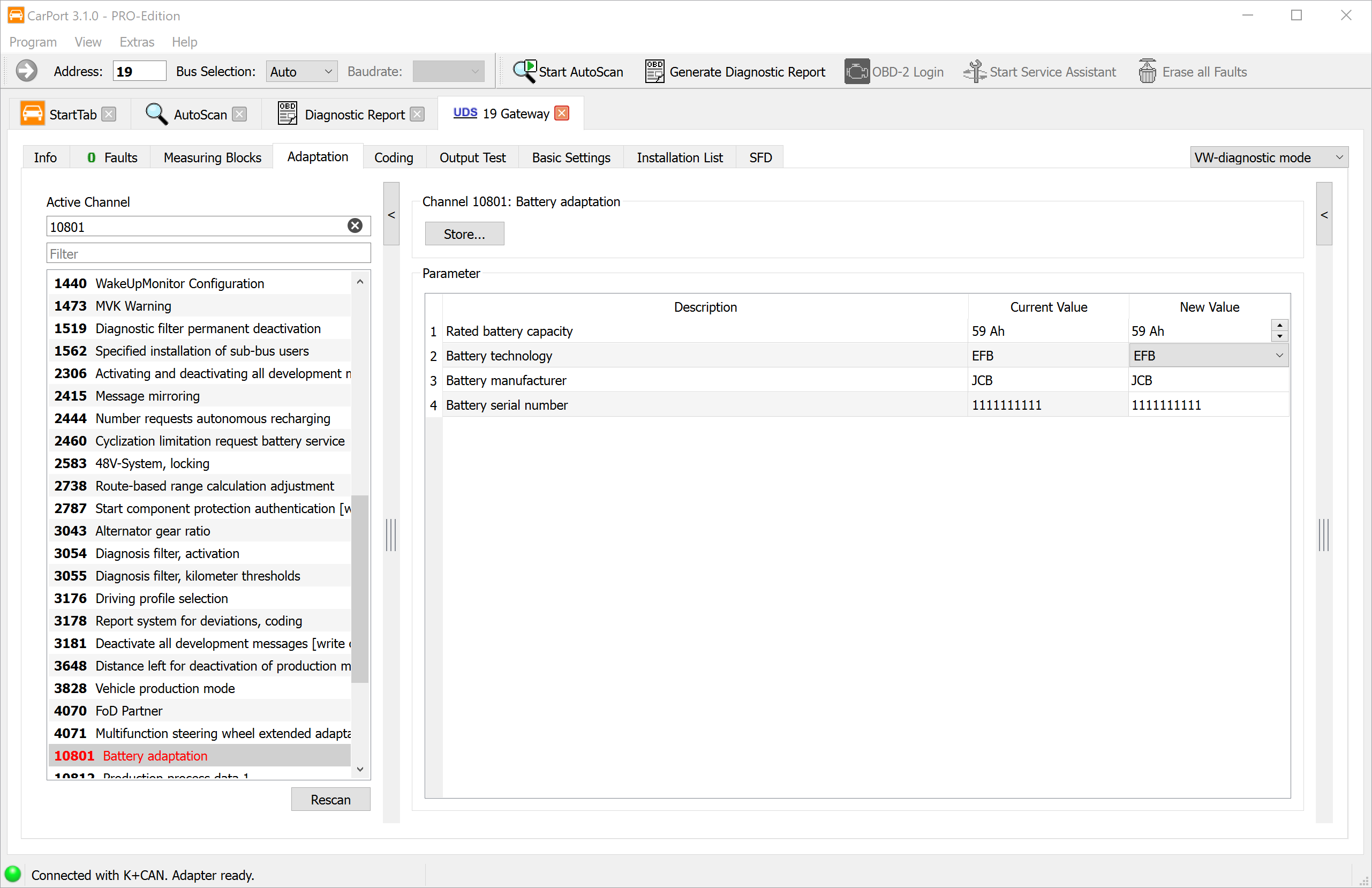
In CarPort, you do this on the diagnostic gateway (address 19) using the Adaptation function.
1. What you need beforehand
The values to be entered are printed on the label of the new battery. Read them off before you install the battery or before the label gets covered:
- Nominal capacity in Ah (e.g. 69 Ah)
- Battery technology (e.g. EFB or AGM – see Step 4)
- Manufacturer (manufacturer code on the label, e.g. JCB)
- Serial number of the battery (unique number on the label)
⚠️ The technology must match: Always enter the technology of the battery actually installed. A vehicle with start-stop needs an EFB or AGM battery – never install a simple flooded battery and never register it as one. Switching from AGM to EFB (or vice versa) is only permitted if the vehicle is approved for it.
2. Prerequisites
- Diagnostic interface is connected (the status bar at the bottom shows e.g. “Connected with K+CAN. Adapter ready.”)
- The new battery is already installed and connected
- Ignition on, engine off
- Stable vehicle voltage (connect a battery charger if necessary)
3. Opening the adaptation channel
- Select the control module 19 – Control module interface for data bus (Gateway).
- Switch to the Adaptation tab.
- In the Filter field, search for
10801orBattery adaptationand select the channel 10801 Battery adaptation in the Active channel list.
Note: On some vehicles/software versions, the battery monitoring is located differently or the channel name varies slightly. The decisive one is the Battery adaptation channel.
4. Entering and saving the values
In the right-hand area you see the four parameters with Stored value and New value. Enter the data of the new battery in the New value column:
| # | Parameter | Example (screenshot) | Source |
|---|---|---|---|
| 1 | Battery nominal capacity | 69 Ah | Label |
| 2 | Battery technology | EFB | Label / battery type |
| 3 | Battery manufacturer | JCB | Label |
| 4 | Battery serial number | 1111111111 | Label |
The values in the table are example values from the screenshot. The correct values depend on your battery and vehicle – always use the details from the label of the new battery.
Then click “Save changes…” at the top. CarPort writes the values to the control module and reads them back for confirmation.
💡 Note down the originally stored values beforehand (the Stored value column) in case you need them again later.
5. Battery technology – possible selection values
The battery technology drop-down offers, among others, the following values:
| Value | Meaning |
|---|---|
| Nass | Conventional flooded battery (without start-stop) |
| Vlies | Fleece battery |
| Wickel6V / Wickel12V | Spiral-cell design (6 V / 12 V) |
| Ultracap | Ultracapacitor |
| Gel | Gel battery |
| Lithium-Ionen | Lithium-ion battery |
| EFB | Enhanced Flooded Battery – start-stop |
| Binär – AGM | AGM (Absorbent Glass Mat) – start-stop, higher load capacity |
| EFB+ | Reinforced EFB |
For MQB vehicles with start-stop, EFB and AGM are the ones that matter in practice. Choose the value that matches the installed battery.
6. Checking the result
- Switch the ignition off and on again.
- Open channel 10801 again – the new values should now be shown as the Stored value.
- Check that no new fault is stored in the battery monitoring control module. Clear the fault memory if necessary.
- The start-stop function should be available again after a short drive, provided the charge level is sufficient.
7. Notes
- Correct technology and capacity: Both values must match the installed battery. Incorrect entries lead to faulty charge control.
- Battery with sensor: If the vehicle has a battery sensor (energy/battery management), adaptation after the replacement is practically always required. Without a sensor it is not mandatory, but recommended.
- Unique serial number: Via the serial number, the vehicle recognizes the battery as “new” and restarts the aging calculation from scratch. All that matters is that the new value differs from the stored one.
- No serial number on the label? If the new battery has no (usable) serial
number, you can simply increase the stored value by 1 (e.g.
…3456→…3457). This ensures the number differs from the old one and the control module recognizes the battery as new. - Missing channels: Depending on the vehicle and coding, not all channels are visible – this is normal and not a fault.