
MQB vehicles (such as the VW Golf 7 or the Audi A3 8V, among others) have an electronic parking brake (EPB) on the rear axle: each rear brake caliper contains an actuator motor that applies the parking brake via a spindle inside the brake piston. Before you replace the rear brake pads, you have to retract this spindle using diagnostics – otherwise you’ll be working against the mechanism when pushing the piston back, damaging the actuator motor or the gear inside the caliper.
In CarPort you do this at control module 03 Brakes via the Basic Settings using the two blocks:
| Block | Function |
|---|---|
| 929 | Start lining change mode – spindles retract, pistons are released |
| 928 | End lining change mode – brake applies and learns the new lining position |
Lining change mode is only needed for the rear axle. You replace the front pads conventionally without a diagnostic tool.
1. Requirements
- The diagnostic interface is connected (the status bar at the bottom shows, e.g., “Connected with K+CAN. Adapter ready.”)
- Ignition on, engine off
- Battery charger connected (see box below)
- Parking brake released (indicator light off)
- Vehicle safely jacked up or on the lift, rear wheels removed
⚠️ Why the charger is mandatory: Throughout the entire procedure the ignition stays on for an extended period – control modules, lights and fans draw a lot of current while the alternator isn’t recharging. On top of that come the actuator motors themselves: they need a lot of current while moving, and when they hit their end stop – fully retracted at the start, at full clamping force at the end – brief load peaks occur at both calipers simultaneously. The EPB system is sensitive to undervoltage: if the voltage drops during the basic settings, the process may abort, faults are stored and, in the worst case, the parking brake stays stuck in the open position. That’s why you should connect a battery charger before the start and leave it connected until the pad change is finished.
2. Start lining change mode (Block 929)
- Select control module 03 – Brakes.
- Switch to the Basic Settings tab.
- Enter
929under Current Block (or select 929 Start lining change mode from the list) and click Set. - Click Start.
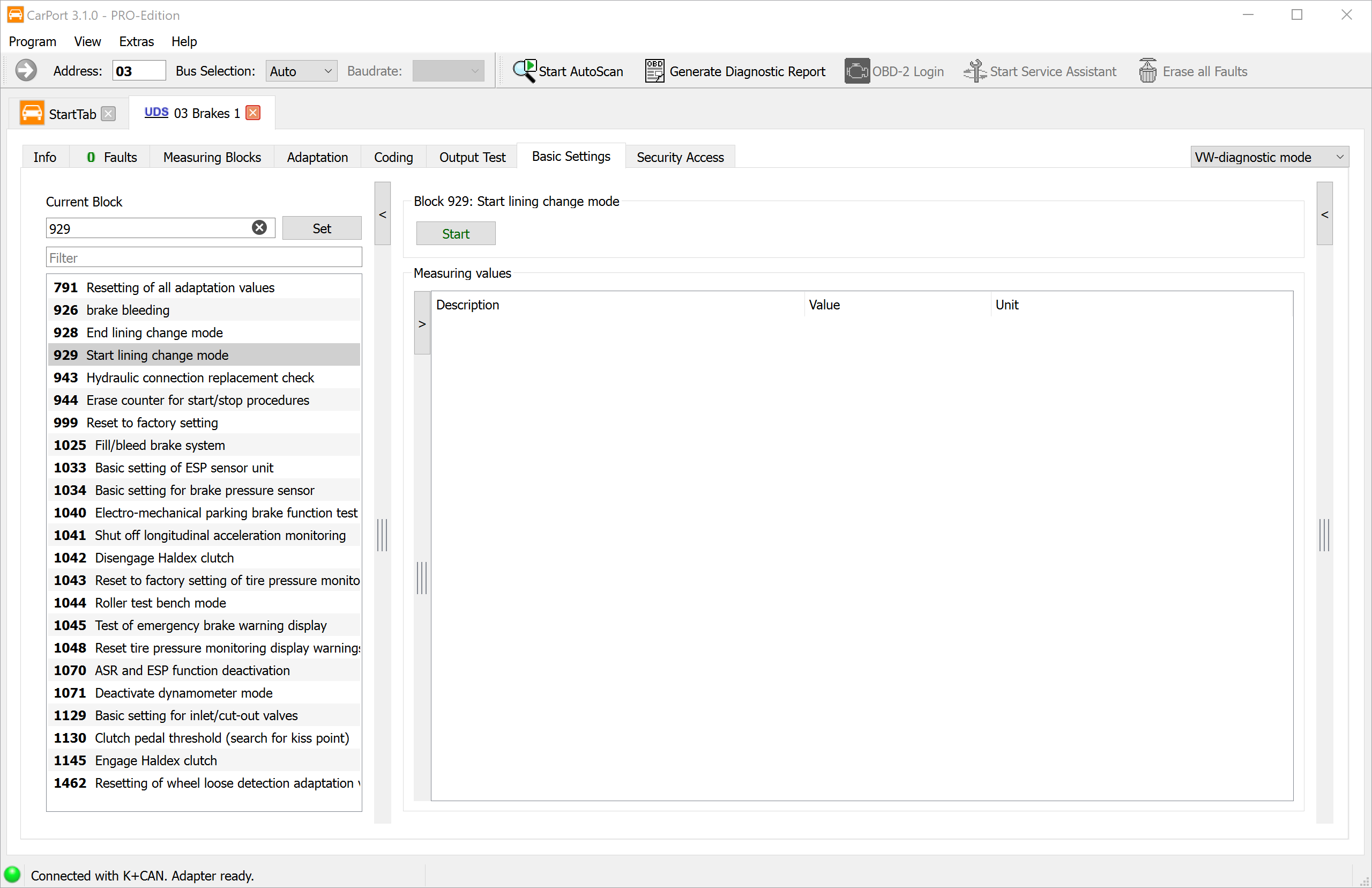
The actuator motors now retract audibly. Wait until the noises have stopped (then wait about another 30 seconds to be safe) before working on the brakes.
Important: The pistons do not retract on their own. The actuator motor only pulls the spindle inside back and releases the piston – you have to push the piston back yourself afterwards (step 3).
3. Replace the pads
You may switch off the ignition to do the wrenching – lining change mode stays active. Leave the charger connected.
- Push the brake piston back straight with a piston retractor tool – do not turn it! Unlike calipers with a mechanical handbrake, the EPB piston is only pushed.
- While doing so, keep an eye on the brake fluid level in the reservoir: the level rises as you push the piston back. If fluid has been topped up in the meantime, the reservoir can overflow – siphon off some beforehand if needed (brake fluid attacks paint).
- Replace the pads (and discs if applicable) as usual.
⚠️ Never operate the parking brake switch while lining change mode is active or the pads are removed! The spindles would run into empty space or push the piston out without pads in place – risk of injury and damage.
4. Build up brake pressure
After reassembly, press the brake pedal several times until it is firm and offers resistance. Only then do the pistons with the new pads rest against the disc – this is a prerequisite for the next step.
5. End lining change mode (Block 928)
- Switch the ignition back on and reopen 03 – Brakes → Basic Settings.
- Enter
928under Current Block (or select 928 End lining change mode) and click Set. - Click Start and wait until the actuator motors have finished.
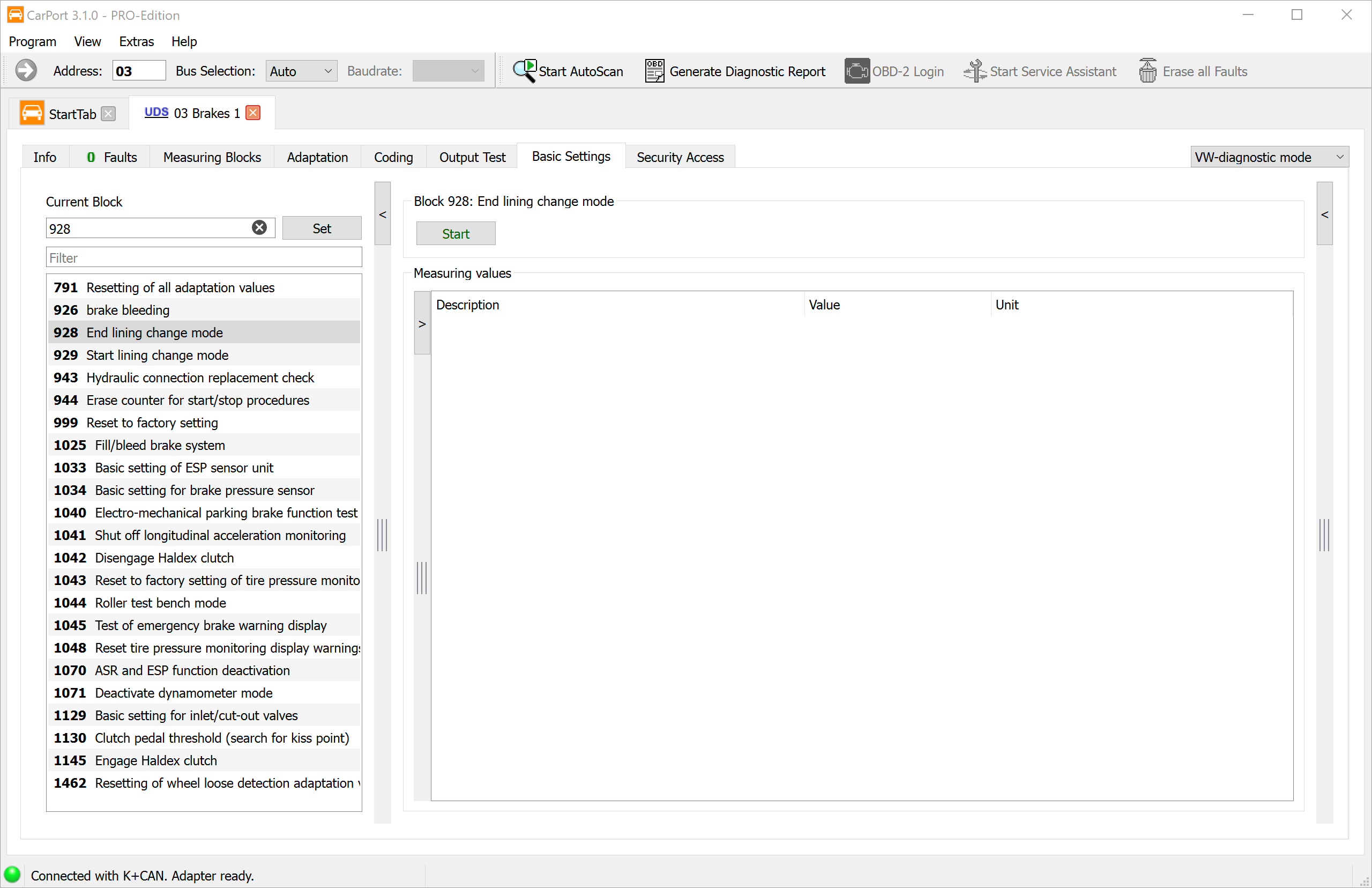
The calibration is already included here: when ending, the parking brake audibly applies, releases again and applies once more. With this apply/release cycle the control module learns the position of the new pads. A separate calibration basic setting is not needed on MQB vehicles – unlike older EPB systems (e.g., the Passat 3C with its own control module 53), which still required a dedicated function check after closing.
6. Check the result
- Operate the parking brake several times via the switch with the brake pedal pressed: apply and release again. The indicator lights must be off afterwards.
- Check the fault memory of control module 03 and clear it if necessary. An entry like “Lining change mode active” during the process is normal and disappears after ending it and running the parking brake cycle.
- Before the first drive, press the brake pedal several more times until it is firm.
7. Notes
- Release the parking brake first: If the parking brake is still applied when you start Block 929, the basic setting aborts. Release it first, then start.
- Abort due to undervoltage: If the process aborts, charge the battery or connect a charger, clear the fault memory and repeat the procedure from step 2.
- Bedding in: Break in new pads gently over the first roughly 200 km and avoid unnecessary full stops so that pads and discs seat against each other.
- Rear axle only: Blocks 928/929 concern exclusively the rear calipers with EPB actuator motors.