
On the diesel engines (TDI) of the MQB platform, every injector is a precision component. For the engine control unit to drive each injector exactly, it must know that injector’s individual correction value. After replacing an injector or the control unit, you enter these values with CarPort on the Adaptation tab – one per cylinder.
There are two variants, depending on the injector’s manufacturer:
- IMA code (e.g. Bosch): a short code printed on the injector that you enter directly.
- Delphi: a longer calibration code that CarPort displays – depending on the control unit – either as readable text or as a hex value. In the hex case you first have to convert it (section 6).
This guide applies to diesel engines. Why petrol engines (TSI) need no coding – and what you should still do there after replacing an injector – is covered in section 9.
1. Which variant applies to your vehicle?
What matters is the injector type, not the model. You identify the variant by the code on the injector, or by the value CarPort shows in channel 768:
| Feature | IMA code (Bosch) | Delphi |
|---|---|---|
| Marking on the injector | short code, approx. 6–7 characters (e.g. C2GKLL0) |
long code, approx. 20 characters (e.g. BS011KR4BAGY3926RYWZ) |
| Entry in CarPort | enter the code directly | directly or – depending on the display – as hex (convert, section 6) |
| Value in channel 768 | short code (C2GKLL0) |
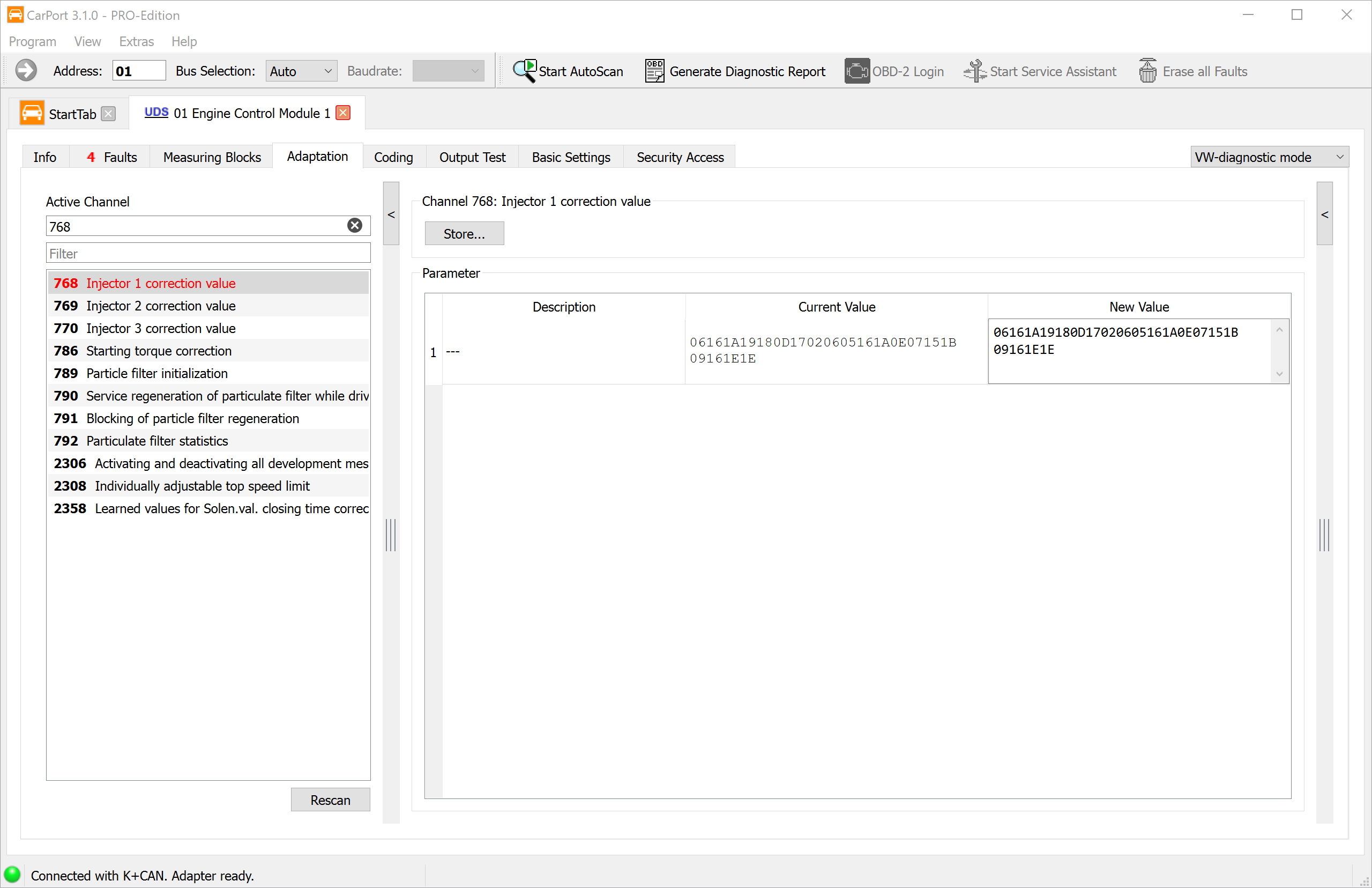
long code (BS011…RYWZ) or hex (06161A19…1E1E) |
The deciding factor is the length of the code: a short code (6–7 characters) is the IMA variant; a long code (approx. 20 characters) – whether as readable text or as a long hex number – is the Delphi variant.
2. Prerequisites
- Diagnostic interface connected (the status bar at the bottom shows e.g. “Connected with K+CAN. Adapter ready.”)
- Ignition on, engine off
- Stable vehicle electrical-system voltage – the voltage must not drop during writing (connect a charger if needed)
- The injectors are mechanically fully installed (new sealing rings/copper washers, correct torque)
⚠️ Important: Before installation, note down the code of every injector together with the cylinder it is being fitted into. Once installed, the marking is often no longer legible – and the code ↔ cylinder assignment is decisive (see section 8).
3. Security Access
Entering the correction values is a write access. Many control units only release the adaptation after you have logged in with an access code (login). Without this authorization, the control unit rejects the save with the message “Security access required”.
- Open the control unit address 01 – engine electronics.
- Switch to the Security Access tab.
- Enter the login code 27971 and confirm.
Not every control unit demands the authorization – some accept the adaptation directly. If the control unit requests it, 27971 is the correct code for injector adaptation. The authorization applies to the current session; after disconnecting you have to enter it again.
4. Opening the adaptation
- If you have not already done so, open the control unit address 01 – engine electronics.
- Switch to the Adaptation tab.
- Select the channel “Injector 1 correction value” (typically 768): enter the number in the “Active Channel” field or search for the description via the Filter.
The injectors are on consecutive channels – one channel per cylinder (typical numbering):
| Channel | Injector / cylinder |
|---|---|
| 768 | Injector 1 |
| 769 | Injector 2 |
| 770 | Injector 3 |
| 771 | Injector 4 |
⚠️ The channel numbers can differ depending on the control unit. Therefore go by the channel description (“Injector 1 correction value”, “… Injector 2” …) and not by the number alone. A four-cylinder engine has four injector channels, a three-cylinder three; that not all channels are visible is normal depending on the engine.
5. Variant A: injectors with an IMA code
The IMA code is printed on each injector and is entered directly.
- Select the channel with the correction value of injector 1.
- In the “New Value” column, enter the code exactly as it appears on the injector of cylinder 1.
- Click “Store…”.
- Repeat this for the channels with the correction values of the other cylinders, using the matching injector code for each.
- Read the values back for verification – Current Value and New Value must match.
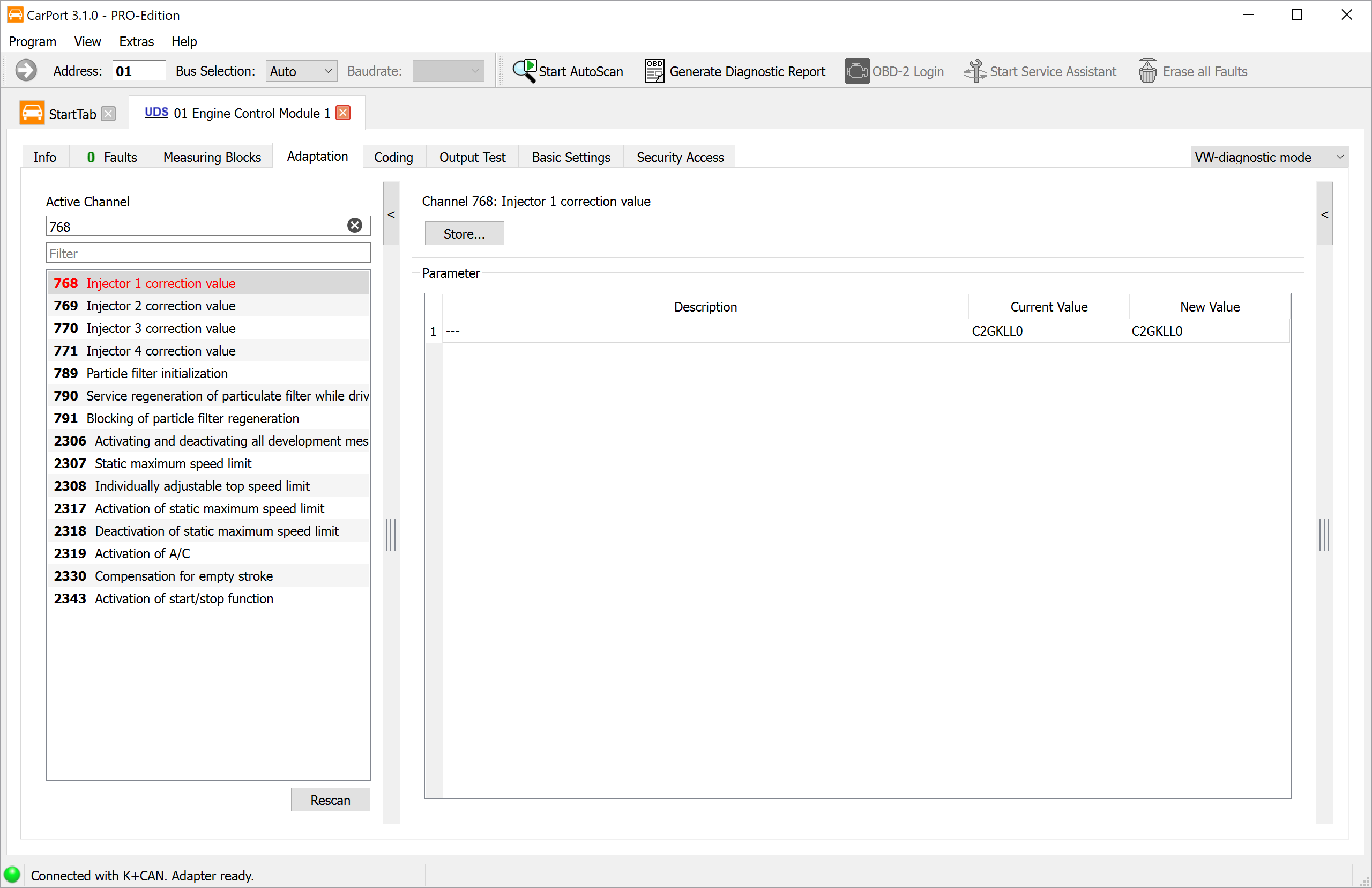
Transfer the code very carefully
6. Variant B: Delphi injectors
Delphi injectors carry a longer code (approx. 20 characters from the character set 0–9 and A–Z, but without the characters I, O, Q, V). Depending on the control unit/vehicle, CarPort shows the correction value in channel 768 in one of two displays:
a) As a readable code (ASCII). In that case you enter the code printed on the injector directly – exactly as with the IMA code (section 5).
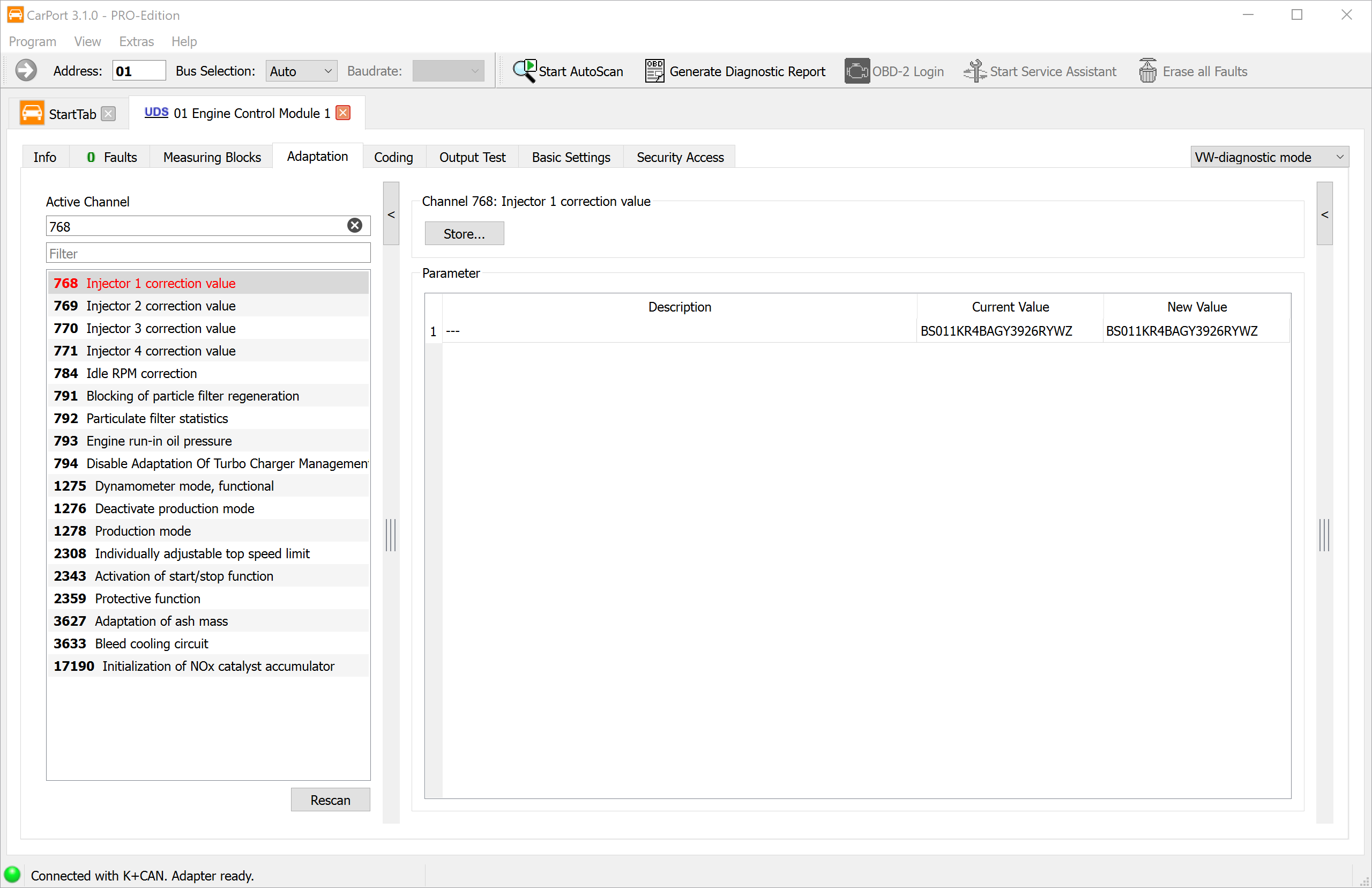
b) As a hex number. In that case the marking cannot be typed in directly – you first have to convert it character by character into hex (table below).
Conversion table (marking character → hex)
Each character of the marking code becomes two hex digits (value 00–1F). The letters I, O, Q, V do not occur in the Delphi code:
| Character | Hex | Character | Hex | Character | Hex | Character | Hex |
|---|---|---|---|---|---|---|---|
| 0 | 00 | 8 | 08 | G | 10 | R | 18 |
| 1 | 01 | 9 | 09 | H | 11 | S | 19 |
| 2 | 02 | A | 0A | J | 12 | T | 1A |
| 3 | 03 | B | 0B | K | 13 | U | 1B |
| 4 | 04 | C | 0C | L | 14 | W | 1C |
| 5 | 05 | D | 0D | M | 15 | X | 1D |
| 6 | 06 | E | 0E | N | 16 | Y | 1E |
| 7 | 07 | F | 0F | P | 17 | Z | 1F |
How to calculate the hex value
- Convert every character of the marking code into its two hex digits using the table.
- Line up the hex pairs into one continuous string.
- The result is twice as long as the marking (20 characters → 40 hex digits). Enter it in “New Value” of the matching channel (768 = cyl. 1, 769 = cyl. 2 …) and click “Store…”.
Example – the marking code 6NTSRDP265NTE7MU9NYY yields exactly the hex value
from the hex screenshot above:
| 6 | N | T | S | R | D | P | 2 | 6 | 5 | N | T | E | 7 | M | U | 9 | N | Y | Y |
|---|---|---|---|---|---|---|---|---|---|---|---|---|---|---|---|---|---|---|---|
| 06 | 16 | 1A | 19 | 18 | 0D | 17 | 02 | 06 | 05 | 16 | 1A | 0E | 07 | 15 | 1B | 09 | 16 | 1E | 1E |
Lined up: 06161A19180D17020605161A0E07151B09161E1E
If in the hex display you accidentally enter the raw marking code, neither the format nor the checksum matches – the value is rejected. Missing or incorrect conversion is the most common stumbling block with Delphi.
7. After coding
By entering the codes, the control unit resets the injector correction values learned during operation. After that:
- Apply and check the values: After saving, switch the ignition off, wait approx. 10 seconds, then switch the ignition on again – this way the control unit adopts the values reliably. Then read the channels out again: Current Value must match the code entered for each cylinder.
- Clear the fault memory – all entries caused by the injector replacement (disconnected plugs, start attempts).
- Carry out an adaptation drive: warm up the engine and operate it in various load and engine-speed ranges (including on the overrun). This lets the control unit learn the new injectors in cleanly.
- Check that no new fault is stored and that the engine runs smoothly.
A formal small-quantity calibration (also known as mean-quantity or zero-fuel-quantity adaptation) is run in the workshop as a guided function (e.g. in ODIS) with the engine at operating temperature. CarPort does not offer this guided calibration – for a normal injector replacement, the coding followed by an adaptation drive is sufficient.
8. Pitfalls
- Wrong cylinder: Each code belongs to exactly the channel of the cylinder the injector sits in. Swapped injectors or codes lead to rough running and poor emissions values. That is why you note the code and the installation position beforehand.
- Character transferred incorrectly: Transfer every character exactly. A possibly valid but wrong code (e.g. from the neighbouring cylinder) is accepted and worsens the running.
- Delphi without (correct) conversion: The code printed on the injectors is not accepted by control units with a hex display. The printed code must first be converted using the table (section 6) and entered as hex digits.
- Missing security access: If the control unit demands an access code, the value cannot be saved without it (“Security access required”) – first unlock it via the Security Access tab (section 3).
- Adaptation drive forgotten: Without an adaptation drive the engine may run roughly for the first few kilometres until it has re-adapted.
- Diesel confused with petrol: TSI petrol engines need no coding (section 9) – there is no input field for injector codes there.
- Voltage drop during writing: Ensure a stable vehicle electrical-system voltage, otherwise writing to the control unit can fail.
- Mechanics: Renew sealing rings/copper washers, fit the injectors with the correct torque and (if present) connect the clamps/return lines correctly.
9. Petrol engines (EA211 / EA888): no coding – but reset the learned values
On the TSI petrol engines of the MQB platform (EA211: 1.0/1.2/1.4/1.5 TSI; EA888: e.g. Golf GTI/R), the injectors are not coded.
Why no coding is necessary
- The petrol injectors carry no IMA code – the engine control units of the petrol engines have no adaptation channels for injector data.
- The control unit compensates for manufacturing tolerances and wear itself: via the lambda control (mixture adaptation) and the rough-running monitoring – it detects a cylinder that steps out of line and automatically adjusts its injection duration.
- The myth that “it has to be taught in” comes from the diesel (where it is mandatory) and from some other manufacturers (e.g. BMW) that also code petrol engines. On the VW petrol engines of this class this is not provided for.
Why you should still reset the learned values
Over thousands of kilometres the control unit has learned to compensate for the old, worn injectors (sluggishness, coking). If the new injectors are driven with these extreme correction values, the engine can run roughly, jerk, start poorly in the first operating hours or set faults such as “Mixture too rich/too lean” or “Combustion misfires” – until it has regulated back over several driving cycles.
If you reset the learned values, the system starts from a clean zero point that matches the new injectors. The fine adaptation then begins correctly right away.
Procedure:
- Clear the fault memory.
- In the engine control unit (address 01) under Adaptation or Basic Settings, run the entry for resetting the learned values of the fuel system / mixture formation.
- Let the engine idle briefly, then take a test drive under various load conditions – the system then re-adapts quickly.
⚠️ Important: On petrol direct injectors (FSI) the Teflon combustion- chamber rings and the O-rings must be renewed at every removal; the Teflon rings require special tooling. This applies regardless of the software.
10. Notes
- Missing channels: Depending on the engine and coding, not all channels are visible – this is normal and not a fault.
- Safety: Only carry out work on the common-rail system (pressures over 2000 bar) and on petrol direct injection if you have the appropriate expertise.