
After a wheel alignment or work on the steering, the steering angle sensor (steering angle sender, G85) must be recalibrated so that ESC and steering assistance work correctly again. On MQB vehicles you trigger the calibration with CarPort via the Basic Settings of the 44 Steering Assistance control unit, turning the steering wheel once fully to the left and to the right – after a few minutes everything is done.
1. When is calibration necessary?
On MQB vehicles the steering angle sensor sits directly in the electromechanical power steering. It reports to the ESC and the assistance systems how far the wheels are turned – if its center position is wrong, the ESC intervenes incorrectly or deactivates entirely. Calibration is necessary after:
- a wheel alignment or toe adjustment,
- work on the steering gear, tie rods, steering column or front axle,
- replacement of the steering or the power steering control unit,
- fault entries such as “Steering angle sender: basic setting not performed” (e.g. B116F) in control unit 44.
Typical symptoms of missing or incorrect calibration:
- yellow or red steering warning light permanently on
- ESC/ABS light on, ESC interventions for no apparent reason
- assistance systems (e.g. lane keeping assist) report a fault
Only disconnected the battery? Then a diagnostic calibration is usually not required. After a few meters of driving straight ahead with slight steering movements, the steering finds its center on its own and the warning light goes out. Only if the light stays on or the basic-setting fault remains stored do you perform the calibration.
Note for those familiar with older models: On older vehicles the steering angle sensor is calibrated via control unit 03 Brake Electronics. On the MQB platform, by contrast, the sensor is taught exclusively via control unit 44 Steering Assistance.
2. Prerequisites
All conditions must be met at the same time, otherwise the control unit refuses the basic setting or learns a wrong center position:
- Diagnostic interface is connected (the status bar at the bottom shows e.g. “Connected with K+CAN. Adapter ready.”)
- Engine running at idle, vehicle standing on a level surface
- Wheels and steering wheel are exactly straight ahead (tolerance approx. ±1.5°)
- Stable electrical system voltage, at least approx. 12.5 V (connect a charger if the battery is weak)
- No fault codes in control unit 44 – except the basic-setting fault itself (fix mechanical causes first)
3. Performing the calibration with CarPort
- Open the 44 Steering Assistance control unit (e.g. enter address 44 in the address field at the top left).
- Switch to the “Security Access” tab and enter the login 19249. Without this authorization the control unit rejects the basic setting.
- Switch to the “Basic Settings” tab.
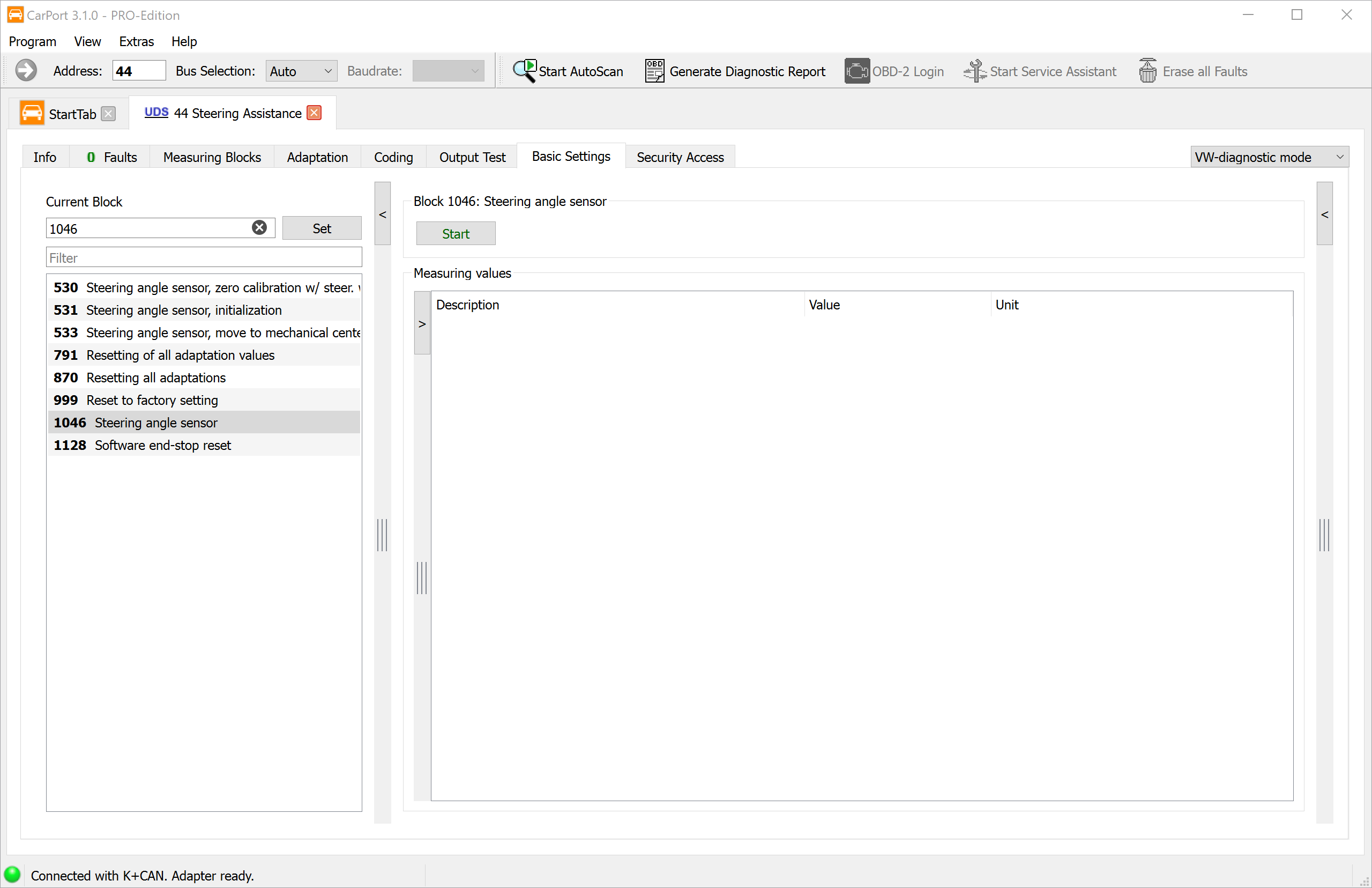
- Select block 1046 “Steering angle sensor” in the block list on the left – fastest via the filter field (enter steering angle) or by entering 1046 in the block field and clicking “Set”.
- Click “Start”.
- Turn the steering wheel slowly once fully to the left up to the stop and hold it there for about 5 seconds.
- Then turn it just as slowly fully to the right up to the stop and again hold it for about 5 seconds.
- Return the steering wheel to the straight-ahead position. CarPort reports completion of the basic setting.
- Switch the ignition off for about 10 seconds and on again.
4. Checking the result
- In control unit 44, open the “Measuring Blocks” tab and check the steering angle: in the straight-ahead position it should show about 0° and change plausibly as you turn the steering wheel.
- Read the fault memory again – the entry “basic setting not performed” must not reappear.
- Take a short test drive with a few steering movements: the steering and ESC warning lights must go out and stay off.
It is normal for warning messages to light up in the instrument cluster during or immediately after the procedure (steering, ESC, and depending on equipment also tire pressure monitoring). After clearing the fault codes and the test drive, all messages should have disappeared.
5. Further basic settings in control unit 44
Besides calibrating the sender (block 1046), the power steering control unit offers further basic settings (the available blocks may differ depending on the steering and software level):
| Block | Basic setting | Purpose |
|---|---|---|
| 530 | Steering angle sensor, zero calibration w/ steering wheel | Sets the zero point (center position) of the steering angle sender |
| 531 | Steering angle sensor, initialization | Initial setup of the sender, e.g. after replacing the steering or control unit |
| 533 | Steering angle sensor, move to mechanical center | Determines the mechanical center of the steering |
| 791 | Resetting of all adaptation values | Deletes all learned steering values |
| 870 | Resetting all adaptations | Resets all adaptations |
| 999 | Reset to factory setting | Factory reset of the control unit |
| 1046 | Steering angle sensor | Standard calibration – this guide |
| 1128 | Software end-stop reset | Deletes the learned software end stops |
⚠️ Do not run the reset routines (791, 870, 999, 1128) “on suspicion.” They delete learned values without reassigning them – afterwards a complete reinitialization of the steering is required. They only belong to special cases such as a component replacement per the repair manual.
Adapting the steering end stops
If, after work on the steering, the control unit additionally reports unlearned end stops (or you have run block 1128), you re-teach them as follows:
- Engine running, vehicle standing.
- Turn the steering wheel slowly (no more than approx. 10° per second) up to the right stop and hold it there for 3–5 seconds.
- Turn it just as slowly up to the left stop and hold again.
- Turn the steering wheel back to the straight-ahead position.
6. Pitfalls and notes
- Begin and end straight ahead: Before the start and after turning through, the wheels and steering wheel must be exactly straight ahead. If the steering wheel is off-center during this, the ESC learns a wrong center position – resulting in incorrect ESC interventions.
- Calibration does not replace a wheel alignment: If the steering wheel is off-center when driving straight, the toe is wrong. First have it measured, then calibrate – do not try to “correct” the misalignment via the calibration.
- Don’t forget the security access: Without the login 19249 the basic setting aborts, e.g. with “Request out of range” or “Function unknown”.
- Fault remains stored? With some steerings the left-right sequence is needed twice. In that case repeat the basic setting and check the fault memory again.
- Keep the voltage stable: If the electrical system voltage drops during calibration, it is aborted or learned incorrectly – when in doubt, connect a charger.
- Steer slowly: Steering movements that are too fast (over approx. 10°/s) prevent the stops from being detected cleanly – during calibration as well as during end-stop adaptation.
- Differing block numbers: Depending on the steering generation and software level, block numbers and designations may differ slightly. When in doubt, search via the filter field for steering angle.