
OBD2 diagnostics
With OBD2 diagnostics, you can read emissions-related fault codes, the readiness status, and live engine data—even with simple ELM327 adapters.
OBD2 (On-Board Diagnostics, generation 2) is a legally mandated, cross-manufacturer diagnostic interface found in all vehicles with gasoline engines from model year 2001 and with diesel engines from model year 2004 (in the EU). Unlike VAG-specific diagnostics, which use proprietary protocols, OBD2 is based on internationally standardized specifications (ISO 15031, SAE J1979).
The primary purpose of OBD2 is monitoring emissions-related systems. The interface provides access to the engine ECU and—if present—the transmission electronics. The available data is limited to:
- Emissions-related fault codes (DTCs in P0xxx format)
- Emissions-related measured values (e.g., engine speed, coolant temperature, oxygen sensor values)
- Readiness status of the emissions monitoring systems
- Freeze frame data from the time a fault was detected
ℹ️ Important: OBD2 doesn't provide access to manufacturer-specific ECUs such as ABS, airbag, comfort electronics, or infotainment. For full access to all vehicle systems, use VAG-specific diagnostics with a compatible interface.
Starting OBD2 diagnostics
There are several ways to start OBD2 diagnostics in CarPort:
- From the start page: Once the interface has been detected, click the
Start OBD-2 diagnostics nowbutton (see Start page). - From the toolbar: Use the
OBD-2 Loginbutton in the upper toolbar. - Via the ECU address: Enter the address
33in the address field of the toolbar and confirm withEnter.
💡 Note: With pure OBD2 interfaces (e.g., ELM327, OBDLink), OBD2 diagnostics is the only function available. ECU selection and AutoScan aren't available with these adapters.
Reading and clearing fault codes
OBD2 diagnostics lets you read and clear emissions-related fault codes. It works the same way as described under Fault memory, but is limited to the standardized OBD2 scope:
- Only standardized fault codes in the format
P0xxx/P2xxx/P3xxxare displayed. - Manufacturer-specific codes (e.g., in VAG's own
16xxxformat) can't be accessed via OBD2. - Freeze frame data can be viewed—if the vehicle provides it.
Readiness status
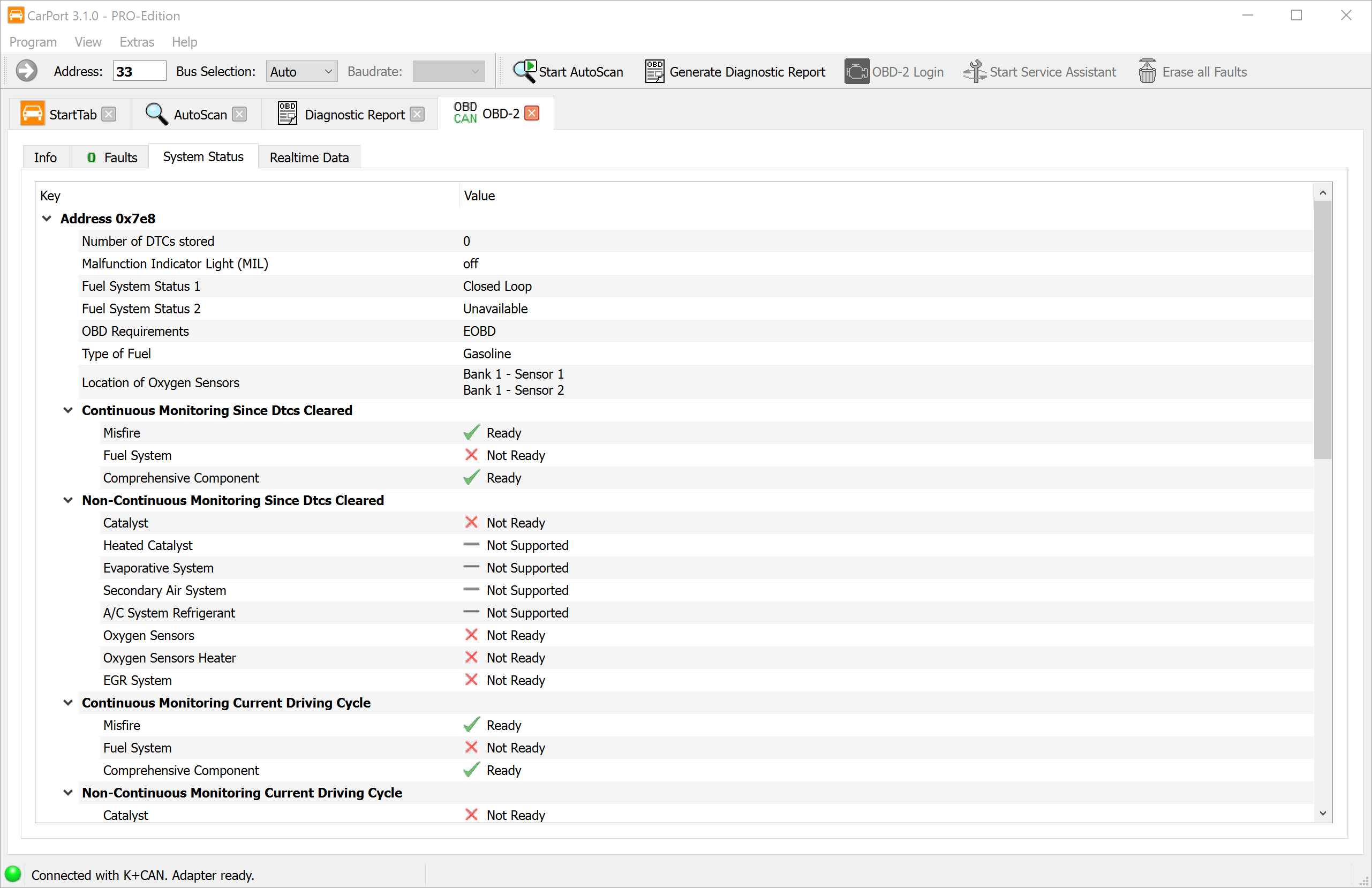
The readiness status shows whether the vehicle's internal monitoring systems (monitors) have successfully completed their self-tests since the fault memory was last cleared. This is particularly relevant for the emissions inspection, since many inspection stations require a complete readiness status.
CarPort shows the status of each monitor at a glance:
- Complete (ready): The monitor has run through its test cycle and hasn't detected any faults.
- Incomplete (not ready): The monitor hasn't completed its test cycle since the fault memory was last cleared. The necessary driving conditions haven't been met yet.
- Not supported: The vehicle doesn't have this monitoring system (e.g., no secondary air system installed).
Typical monitors include:
| Monitor | Description |
|---|---|
| Catalyst | Checks the conversion efficiency |
| Heated catalyst | Checks the heating function |
| Fuel system | Monitors mixture control |
| Oxygen sensors | Function check of the exhaust gas sensors |
| Oxygen sensor heater | Checks the heater circuits |
| Misfire | Detects ignition misfires |
| Secondary air system | Checks the secondary air pump |
| Evaporative system (EVAP) | Leak test of the fuel vapor system |
| EGR system | Function check of the exhaust gas recirculation |
💡 Tip: Clearing the fault memory resets all monitors to “incomplete.” To restore the readiness status, the vehicle-specific drive cycles must be completed. Depending on the monitor, this may take several drives under specific conditions (city driving, highway driving, cold start).
Live data (PIDs)
OBD2 provides real-time measured values via so-called PIDs (Parameter IDs). These standardized identifiers define which sensor data the engine ECU returns on request. CarPort automatically queries the available PIDs and displays the supported values with plain-text names and physical units.
Commonly available PIDs include:
- Engine speed (RPM)
- Vehicle speed (km/h)
- Coolant temperature (°C)
- Intake air temperature (°C)
- Engine load (%)
- Oxygen sensor values (voltage / ratio)
- Fuel pressure (kPa)
- Ignition timing (° before TDC)
- Short-term and long-term fuel trim (%)
Displaying and working with live data follows the same procedure as described under Measured values. You can select values, visualize them in the graph, and record them via logging.
ℹ️ Note: Which PIDs a vehicle actually supports varies by manufacturer, model, and model year. Not every vehicle provides all standardized PIDs.
Differences from VAG-specific diagnostics
OBD2 diagnostics and VAG-specific diagnostics complement each other, but they differ fundamentally in scope and capabilities:
| Feature | OBD2 diagnostics | VAG-specific diagnostics |
|---|---|---|
| Access to ECUs | engine and, if applicable, transmission only | all installed ECUs |
| Fault codes | emissions-related fault codes only | complete fault memory of all systems |
| Measured values | standardized PIDs | all manufacturer-specific measured values |
| Coding | not available | available |
| Adaptation | not available | available |
| Output test | not available | available |
| Basic settings | not available | available |
| ECU selection | not available (fixed address) | all addresses selectable |
| AutoScan | not available | available |
| Required interface | any OBD2 interface (e.g., ELM327) | VAG-compatible interface (e.g., AutoDia K509, K+CAN Commander 1.4) |
When should you use OBD2?
- You only have an OBD2 interface (e.g., ELM327, OBDLink).
- You want to quickly check the check engine light (MIL) or verify the readiness status before the emissions inspection.
- You're diagnosing emissions-related engine problems.
When should you use VAG-specific diagnostics?
- You need access to other ECUs (e.g., ABS, airbag, air conditioning, steering).
- You want to perform coding, adaptations, or basic settings.
- You need the complete fault memory across all vehicle systems (AutoScan).