
Security access & SFD
Security access, SFD, and Secure Gateway: how VAG vehicles protect coding and adaptation, and what this means for diagnostics with CarPort.
Read functions such as fault memory, measured values, and ECU info are available without restriction on all vehicles. Write functions such as coding, adaptation, and basic settings, on the other hand, are secured differently by the Volkswagen Group depending on the vehicle generation. For diagnostic work with CarPort, it's important to know the differences, because they directly affect the available feature set.
Protection levels at a glance
In the vehicle list, newer models are marked with the notes SFD and SFD/UNECE. The following table shows which functions are available at each protection level:
| Vehicle generation | Protection | Read functions | Clear fault memory | Write functions |
|---|---|---|---|---|
| Before 2020 | Security access / Login | Unrestricted | Unrestricted | After entering the access code |
| From about 2020 (SFD) | SFD | Unrestricted | Unrestricted | After SFD unlock (token/key) |
| From about 2024 (SFD/UNECE) | Secure Gateway + SFD | Unrestricted | Unrestricted | After gateway authentication + SFD unlock |
Security access
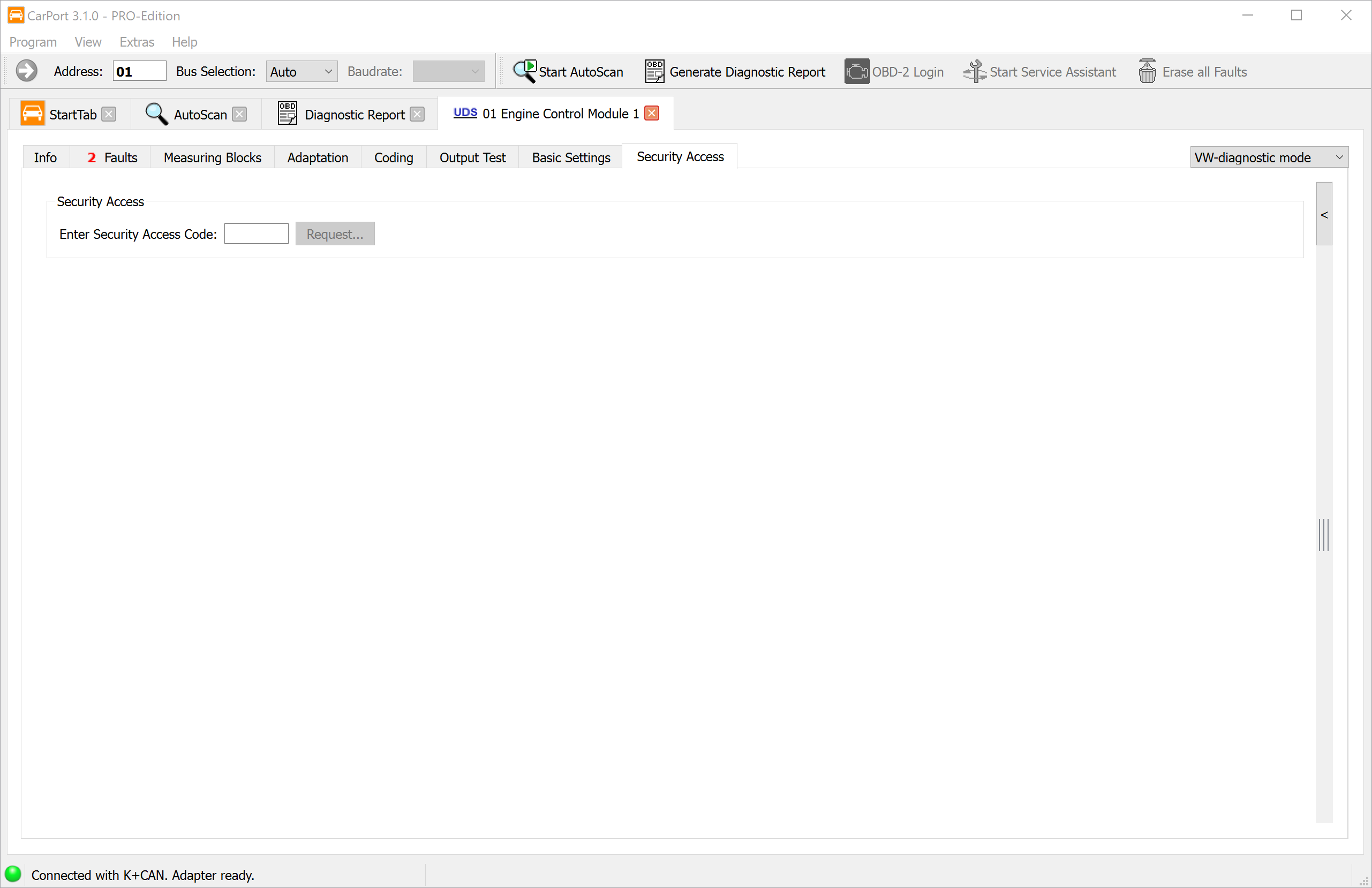
Security access is a protection mechanism that unlocks certain diagnostic functions of an ECU only after a 5-digit numeric code has been entered. This prevents safety- or homologation-relevant parameters from being changed accidentally or without authorization.
- Protocols: KWP2000 and UDS only. With KWP1281, the Login function is used instead; with KWP2000, the Coding II function is also available.
Which functions are protected?
Security access is typically required for the following actions:
- Adaptations (e.g., injector quantity values, key learning)
- Basic settings (e.g., brake calibration)
- Coding changes on certain ECUs
Multiple access levels:
An ECU can have several access codes, each of which unlocks different function areas. For example, one code might allow adaptation, while another code is required for basic settings.
💡 Tip: If label data is available for the ECU, CarPort shows the available access levels with plain-text names in a selection list. You'll find an overview of commonly needed codes under Access codes for VAG ECUs.
Step-by-step instructions:
- Enter the 5-digit access code in the input field or, if label data is available, select the matching entry from the list.
- Click
Request.... - Confirm the request in the dialog that appears.
- If successful, the corresponding function level is unlocked. CarPort indicates this in the status display.
Behavior after an incorrect entry:
If an incorrect code is entered, the ECU blocks further access attempts for a manufacturer-defined waiting period (often 10–30 seconds, longer after repeated incorrect entries). During this lockout period, the ECU rejects every further code—even the correct one.
⚠️ Caution: After an incorrect entry, wait for the full lockout period to expire before trying again. If you enter a code again immediately—even the correct one—the ECU may reject it and extend the lockout period.
Login / Coding II
The Login and Coding II functions are protection mechanisms of the older KWP1281 and KWP2000 diagnostic protocols. They serve a similar purpose to security access, but work differently.
Difference from security access:
| Feature | Security access | Login / Coding II |
|---|---|---|
| Protocols | KWP2000, UDS | KWP1281, KWP2000 |
| Effect | Unlocks a function level | Performs an action directly or combines unlocking with coding |
| Code format | 5-digit numeric code | 5-digit numeric code |
Login:
A login sends a code to the ECU that directly unlocks or triggers a specific function. Unlike security access, which merely opens an authorization level, a login can bring about a configuration change immediately.
Coding II:
Coding II combines entering a code with a simultaneous coding change. This lets you unlock functions that aren't accessible via regular coding. A typical example is enabling cruise control (GRA): entering the matching code activates the cruise control function in the ECU.
Step-by-step instructions:
- Enter the code in the input field or, if label data is available, select the matching entry from the list.
- Click
Login.... - Confirm the action in the dialog that appears.
ℹ️ Note: Whether an ECU supports Login or Coding II is ECU-specific and depends on its firmware. Not every ECU offers this function. If label data is available, CarPort shows the available login options with plain-text names.
SFD (Vehicle Diagnostics Protection)
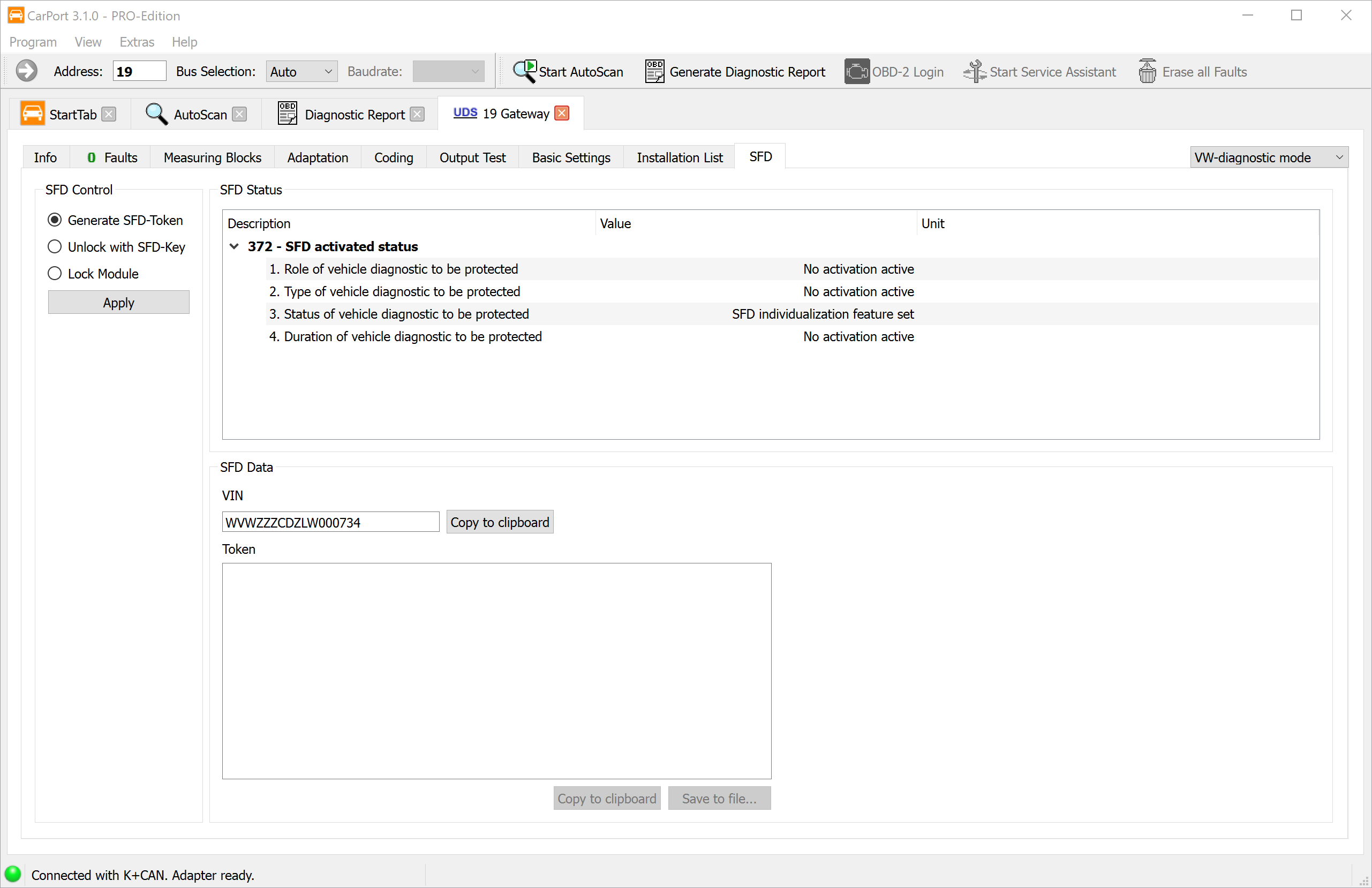
SFD (Vehicle Diagnostics Protection) is a cryptographic protection mechanism that the Volkswagen Group has been using in its ECUs since around model year 2020 (Golf 8, Octavia 4, SEAT Leon 4, and others). On these vehicles, it replaces the previous security access and protects write diagnostic functions such as coding, adaptation, and basic settings from unauthorized access.
Difference from security access:
| Feature | Security access | SFD |
|---|---|---|
| Protection method | Static 5-digit numeric code | Cryptographic challenge-response method (token + key) |
| Vehicle binding | Code applies to all vehicles with the same ECU | Key is bound to the individual vehicle identification number (VIN) |
| Protocols | KWP2000, UDS | UDS only |
| Validity | Permanently valid | Limited in time or per session (depends on the manufacturer) |
How do you recognize an SFD-protected ECU?
If an ECU is protected by SFD, CarPort shows the SFD tab once the connection is established. In this case, there's no Security Access tab. Without a prior SFD unlock, write functions (coding, adaptation, basic settings) are locked—read functions such as reading the fault memory and measured values remain available without restriction.
Unlocking via the offline procedure:
CarPort supports SFD unlocking via an offline procedure. First, a vehicle-specific token is generated, which is then exchanged for an unlock code (key) with an external service (third-party provider).
ℹ️ Important: CarPort can't generate SFD keys itself. Keys are calculated exclusively by external online services (third-party providers). However, CarPort supports the entire process of generating the token and applying the key to make unlocking as easy as possible.
Step-by-step instructions:
- Open the SFD tab in the connected ECU. The
SFD Statusarea shows the current protection status. - Under
SFD Control, select theGenerate SFD-Tokenoption and clickApply. - The ECU generates an individual token, which is displayed in CarPort. The vehicle identification number (VIN) is displayed as well.
- Copy both values (token and VIN). The
Save to file...button lets you conveniently save both values in a text file. - Open the online service of an SFD provider (third-party provider) and enter the token and the VIN there to receive the unlock code (key).
- Switch back to CarPort. Under
SFD Control, select theUnlock with SFD-Keyoption, enter the key you received, and clickApply. - If the unlock is successful, CarPort displays a confirmation. The write diagnostic functions are now available.
ℹ️ Note: Depending on the ECU, the SFD unlock may be limited in time. Once it expires or the connection is closed, you may have to repeat the process.
Secure Gateway (SFD/UNECE)
From model year 2024, the Volkswagen Group implements a so-called Secure Gateway in addition to SFD, in connection with UNECE Regulation R155 (UN regulation on vehicle cybersecurity). This combination is marked as SFD/UNECE in the vehicle list and is often also referred to as SFD2.
The Secure Gateway is an access barrier at gateway level that restricts the communication path between the diagnostic interface and the ECU—even before the ECU's own SFD protection comes into play. It is therefore a two-stage protection:
| Stage | Mechanism | Level | Effect |
|---|---|---|---|
| 1. Secure Gateway | Gateway filters diagnostic commands | Vehicle gateway (addr. 19) | Only authorized commands are forwarded to ECUs |
| 2. SFD | Cryptographic authentication | Individual ECU | Write functions only after token/key unlock |
Impact on diagnostics with CarPort:
Without additional authentication with the Secure Gateway, the following functions are available on SFD/UNECE vehicles:
- Reading the fault memory
- Clearing the fault memory
- Reading ECU info
- Reading measured values
The following functions are not available until gateway authentication has taken place:
- Coding
- Adaptation
- Basic settings
- Output test
- Changing the installation list
In addition, only the OBD diagnostic mode is available (see Diagnostic mode).
⚠️ Important: Unlocking the Secure Gateway requires authentication at gateway level that goes beyond the previous SFD mechanism. This is a restriction imposed by the manufacturer that affects all independent diagnostic systems equally. CarPort supports SFD unlocking at ECU level (see SFD), but gateway authentication depends on the availability of compatible unlock services.